



Key Takeaways
The Reality
- Malware can do far more than most businesses expect
- The damage is often silent until it’s too late
The Risk
- A single mistake can open the door to serious consequences
- Attacks are designed to spread and escalate quickly
The Impact
- The cost isn’t just technical, it’s financial and reputational
- Even small incidents can lead to major disruption
The Bottom Line
- Most threats are preventable with the right strategy
- The difference is how prepared you are before it happens
Introduction
When businesses ask “what can malware do?”, they are often underestimating the scope, sophistication, and damage modern cyber threats can cause.
Malware is no longer just a nuisance—it is a strategic weapon used by cybercriminals to steal data, disrupt operations, and extract money.
At Silverback Consulting, we see firsthand how malware affects organizations of all sizes.
This guide answers the most important questions about malware in a clear, actionable way, so you can understand the risks and protect your business effectively.
What Can Malware Really Do to Your Business? ▼
What Can Malware Do to Your Business Systems?
Malware can infiltrate, control, and destroy your systems in ways that are often invisible until it’s too late.
1. Steal Sensitive Data
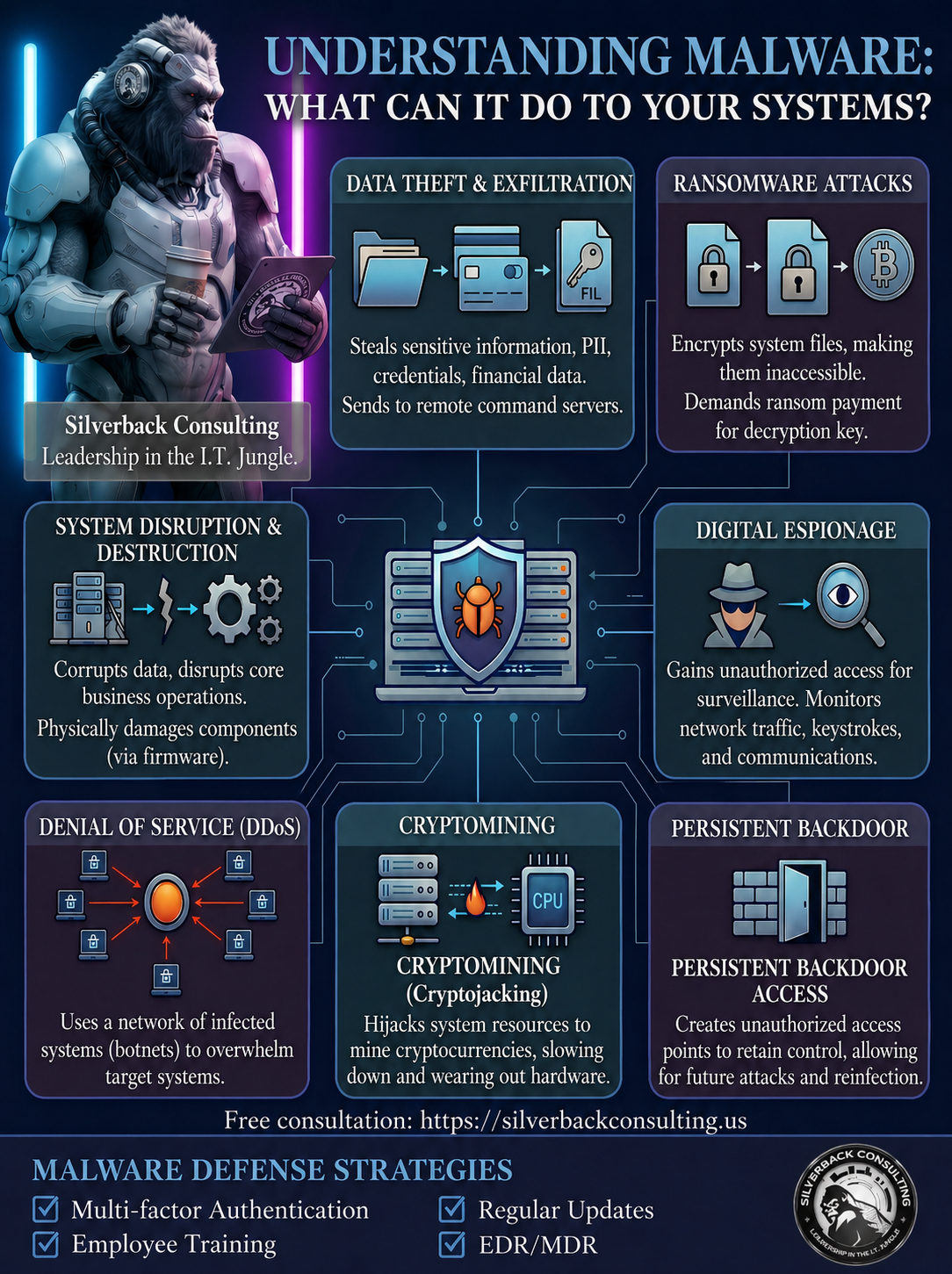
One of the most dangerous answers to “what can malware do” is simple: it can steal everything.
- Login credentials
- Financial information
- Customer databases
- Intellectual property
Once inside your network, malware can quietly collect and transmit this data to attackers without triggering alerts.
2. Lock You Out with Ransomware
Ransomware is one of the most damaging forms of malware today.
- Files become encrypted
- Systems become unusable
- Attackers demand payment for access
Businesses often face downtime, lost revenue, and reputational damage—even if they pay the ransom.
3. Spy on Your Activity
Certain types of malware act as digital surveillance tools.
- Record keystrokes (keyloggers)
- Capture screenshots
- Monitor communications
This allows attackers to gather credentials and confidential conversations over time.
4. Destroy or Corrupt Data
Malware can delete, alter, or corrupt critical files, making recovery difficult or impossible.
- Financial records erased
- Databases damaged
- Backups compromised
This type of attack is especially devastating for businesses without strong backup strategies.
5. Take Control of Your Systems (Botnets)
Malware can turn your devices into remote-controlled machines.
- Used to launch cyberattacks on others
- Send spam emails
- Mine cryptocurrency
This not only impacts performance but can also get your business blacklisted or legally exposed.
What Can Malware Do to Your Network?
Malware doesn’t stop at one device—it spreads.
6. Spread Across Your Entire Organization
Once inside, malware can move laterally:
- Infect multiple devices
- Compromise servers
- Access shared systems
This is how small infections turn into full-scale breaches.
7. Create Backdoors for Future Attacks
Even after removal, malware can leave behind hidden access points.
- Attackers can return anytime
- Systems remain vulnerable
- Detection becomes harder
This persistence makes malware particularly dangerous.
What Can Malware Do to Your Finances?
The financial impact of malware is often underestimated.
8. Direct Financial Theft
Cybercriminals can:
- Transfer funds
- Intercept transactions
- Manipulate invoices
These attacks are often subtle and difficult to trace.
9. Cause Operational Downtime
When systems go offline:
- Employees can’t work
- Customers can’t access services
- Revenue stops immediately
Downtime can cost thousands—or millions—per hour depending on your business.
10. Lead to Regulatory Fines
If malware results in a data breach, your business may face:
- Compliance violations
- Legal penalties
- Lawsuits
This is especially critical for industries handling sensitive data.
What Can Malware Do to Your Reputation?
Reputation damage is one of the longest-lasting effects.
11. Erode Customer Trust
Customers expect their data to be secure. A breach can:
- Drive customers away
- Damage brand credibility
- Impact long-term growth
12. Harm Business Relationships

Partners and vendors may reconsider working with you if your systems are compromised.
- Contracts may be lost
- Partnerships weakened
- Opportunities missed
How Does Malware Actually Get In?
Understanding “what can malware do” also means understanding how it gets inside.
Common Entry Points
- Phishing emails
- Malicious downloads
- Infected websites
- Weak passwords
- Outdated software
Most attacks exploit human error or unpatched vulnerabilities.
What Types of Malware Should You Be Aware Of?
To fully answer what can malware do, you need to understand the different types.
Viruses
Attach to files and spread when executed.
Trojans
Disguise themselves as legitimate software.
Ransomware
Encrypts data and demands payment.
Spyware
Secretly monitors user activity.
Adware
Displays unwanted ads and tracks behavior.
Worms
Spread automatically across networks.
Each type has a different objective, but all pose serious risks.
How Can You Tell If You’ve Been Infected?
Malware often operates silently, but there are warning signs:
- Slow system performance
- Unexpected pop-ups
- Unauthorized logins
- Files disappearing or changing
- Security software disabled
If you notice these, immediate action is critical.
How Can You Protect Your Business from Malware?
Knowing “what can malware do” is only useful if you act on it.
Implement Strong Security Measures
- Advanced endpoint protection
- Firewall configuration
- Email filtering
Keep Systems Updated
Outdated software is one of the easiest ways into your systems.
Train Your Employees
Human error is the #1 attack vector.
- Recognize phishing
- Avoid suspicious downloads
- Use strong passwords
Use Regular Backups
Ensure backups are:
- Frequent
- Secure
- Tested
Partner with a Cybersecurity Expert
Working with a provider like us at Silverback Consulting ensures:
- 24/7 monitoring
- Threat detection
- Rapid response
Why Businesses Choose Silverback Consulting
At Silverback Consulting, we don’t just answer the question “what can malware do”—we actively prevent it from impacting your business.
We deliver:
- Managed Security Services (MSSP)
- Real-time threat monitoring
- Proactive vulnerability management
- Incident response and recovery
Our approach is built to stop threats before they become costly problems.
Conclusion: What Can Malware Do?
So, what can malware do?
It can steal, destroy, spy, encrypt, spread, and cripple your business operations—often without warning.
The real question isn’t whether malware is dangerous—it’s whether your business is prepared.
If you’re unsure about your current security posture, now is the time to act. Prevention is always more cost-effective than recovery.
What can malware do to your computer?
Malware can steal data, monitor your activity, corrupt or delete files, slow down performance, and even give attackers full remote control of your computer.
Is malware illegal?
Yes, creating, distributing, or using malware to harm systems, steal data, or extort money is illegal in most countries and can lead to severe penalties.
What can malware do to your phone?
Malware on your phone can track your location, steal passwords, access banking apps, record calls, send messages without your knowledge, and drain your battery or data.
Where is malware most commonly placed?
Malware is most commonly hidden in phishing emails, malicious downloads, infected websites, software cracks, and fake apps.
How to know if you downloaded malware?
You may notice slow performance, unexpected pop-ups, unauthorized logins, missing files, or security programs being disabled.
What to do if you download malware?
Disconnect from the internet, run a trusted antivirus scan, remove the threat, update your software, and consider contacting a cybersecurity professional.
What types of damage can malware cause to personal computers?
Malware can cause data loss, identity theft, financial fraud, system crashes, and long-term performance issues.
What are the common ways malicious software can steal my financial information?
Malicious software can use keyloggers, fake login pages, browser hijacking, and spyware to capture banking credentials and credit card details.
How can I determine if my computer’s performance issues are caused by a virus?
If your system suddenly becomes slow, crashes frequently, or runs unknown processes even when idle, a virus or malware infection could be the cause.
Can ransomware permanently encrypt my files, and what are my recovery options?
Ransomware can permanently encrypt files if no backups exist, and recovery options typically include restoring from backups or using decryption tools if available.
Can a malicious program disable my existing security protection?
Yes, advanced malware can disable antivirus software, firewalls, and security updates to avoid detection and maintain control.
How do companies handle malware attacks, and what incident response tools are recommended?
Companies handle malware attacks by isolating affected systems, removing the threat, restoring data, and using tools like endpoint detection and response (EDR), SIEM platforms, and managed security services to prevent future incidents.
Don’t Wait Until Malware Shuts You Down

If you’re still wondering “what malware can do”, the real answer is simple—it can disrupt, damage, and cost you more than you expect. Take control of your cybersecurity before it’s too late. Call (719) 452-2205 today to speak with our experts and protect your business.

Silverback Consulting
303 South Santa Fe Ave
Pueblo, CO 81003
support@silverbackconsulting.us
“Leadership in the I.T. Jungle”
